목차
- Firebase 설치
- CLI 설치 (Firebase & FlutterFIre)
- Firebase 연동
- CLI 로 firebase와 프로젝트 연동
- 연동 확인
- 기타 설정
- 페이지별 코드
✅ Firebase 설치
1️⃣ CLI 설치 (Firebase & FlutterFIre)
- Firebase 설치 방식 (2종류)
- 실행할 앱의 운영체제 별 설치 (ios / android) (각 운영체제 별 설치 방법이 상이)
- 운영체제 통합 버젼인 CLI 설치 (** 해당 게시글은 CLI 설치로 진행)
** Firebase CLI 와 FlutterFire CLI 둘 다 설치
- 명령어
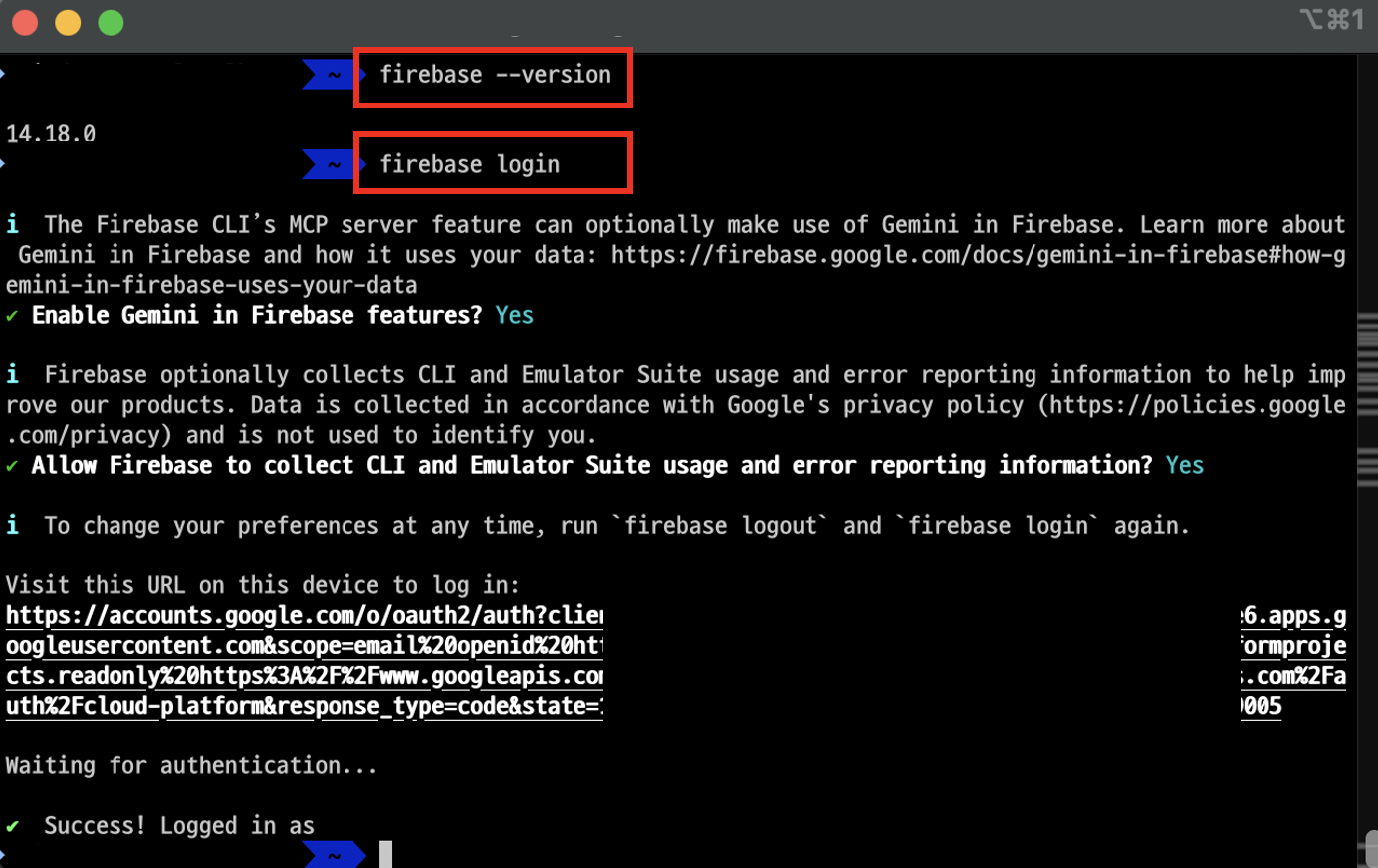
- brew install firebase-cli : Firebase CLI 설치
- firebase login
- 기타 설정
- “Gemini in Firebase”(AI 지원 기능) 사용 여부
- Firebase CLI에서 로그인한 직후 “사용 통계 수집 허용 여부”
- 기타 설정
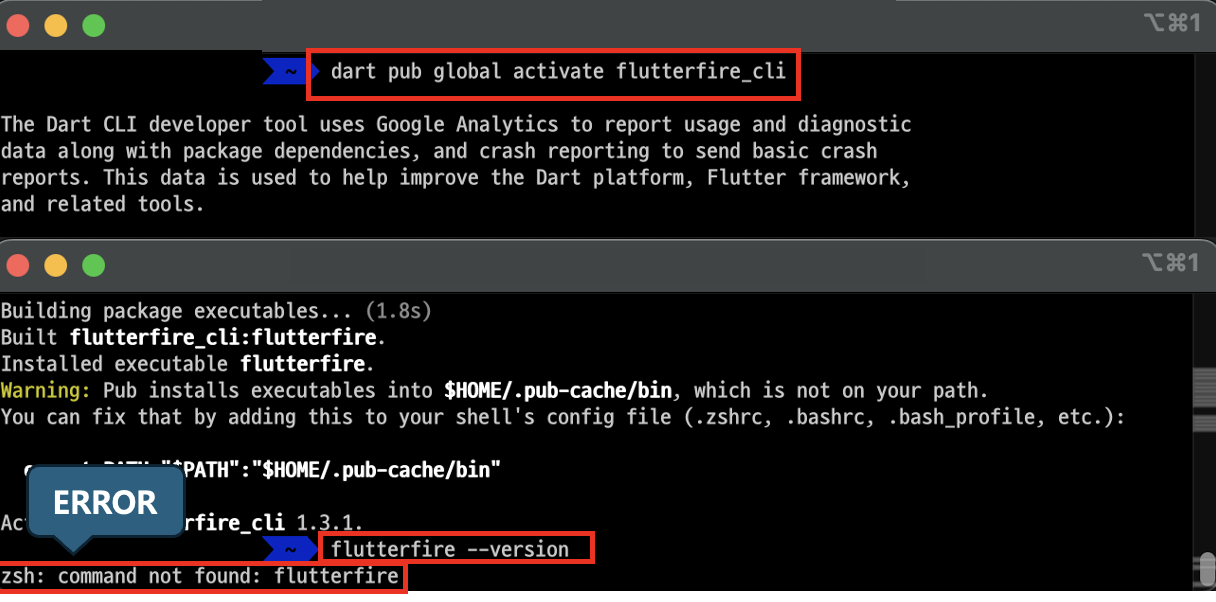
- dart pub global activate flutterfire_cli : FlutterFire CLI 설치
- flutterfire --version : CLI 버젼확인 (정상설치 여부)
- 에러 메세지 : zsh: command not found: flutterfire
- FlutterFire CLI가 설치되지 않아서 생긴 에러
- Firebase CLI는 설치했지만 Flutter 프로젝트와 Firebase를 연결하는 FlutterFire CLI는 아직 없는 상태
- 에러 메세지 : zsh: command not found: flutterfire
- PATH 재설정
- echo 'export PATH="$PATH:$HOME/.pub-cache/bin"' >> ~/.zshrc
- source ~/.zshrc
- which flutterfire
- flutterfire --version


✅ Firebase 연동
1️⃣ CLI 로 firebase와 프로젝트 연동
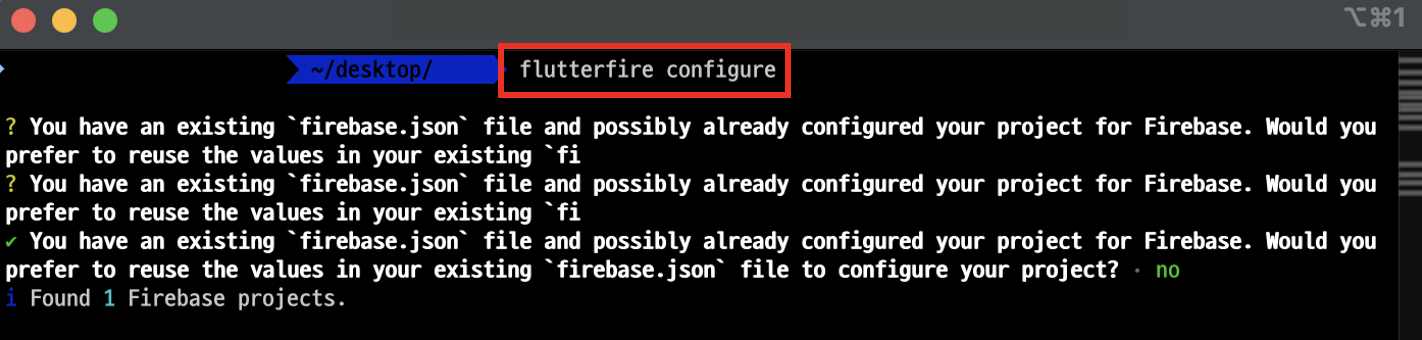
- flutterfire configure : firebase와 프로젝트 계정 연동
2️⃣ 연동 확인
- flutter 프로젝트 lib 파일 내에 'firebase_options.dart' 파일이 생성되면 정상 연결

3️⃣ 기타 설정
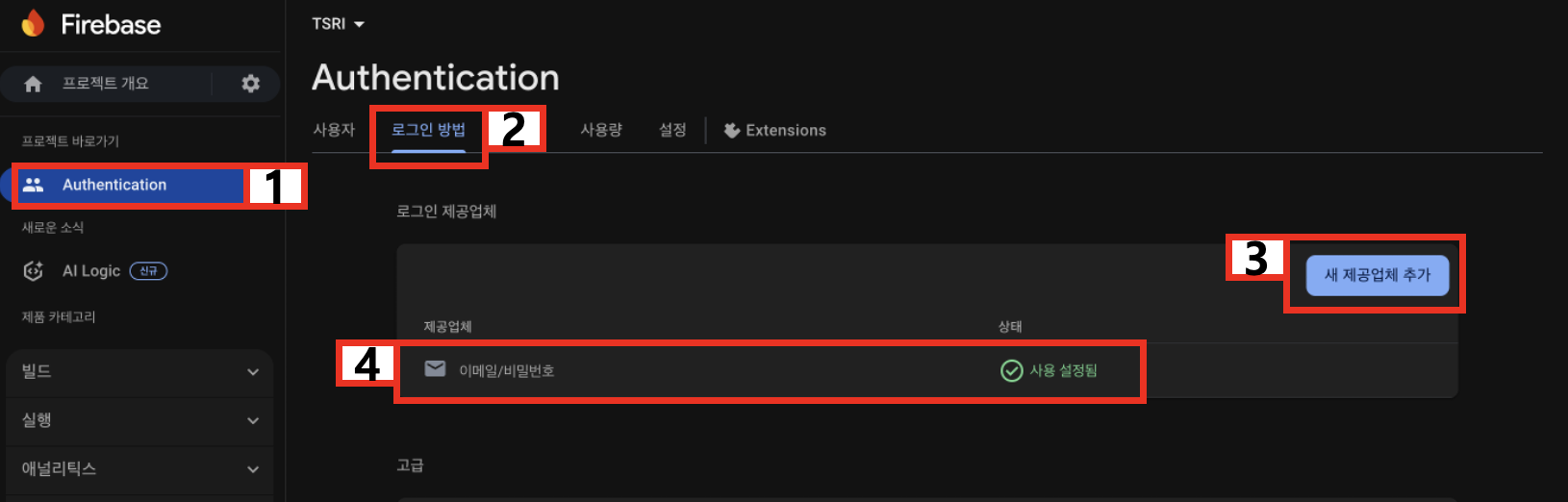
- firebase에서 로그인 권한 설정(Authentication)
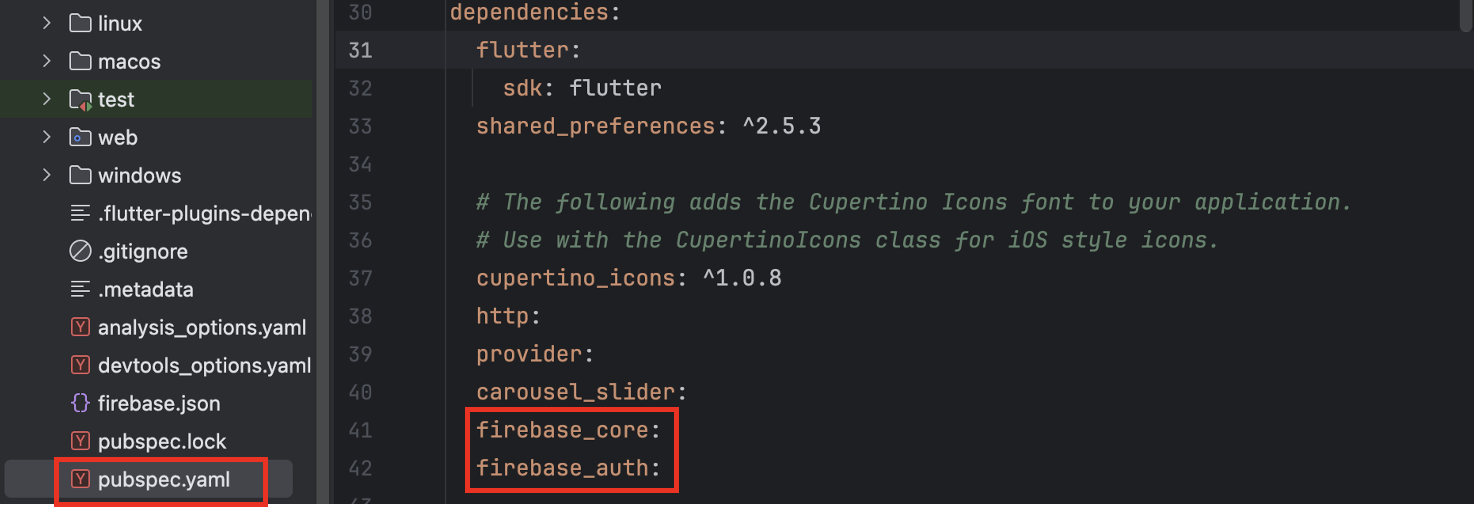
- pubspec.yaml 설정
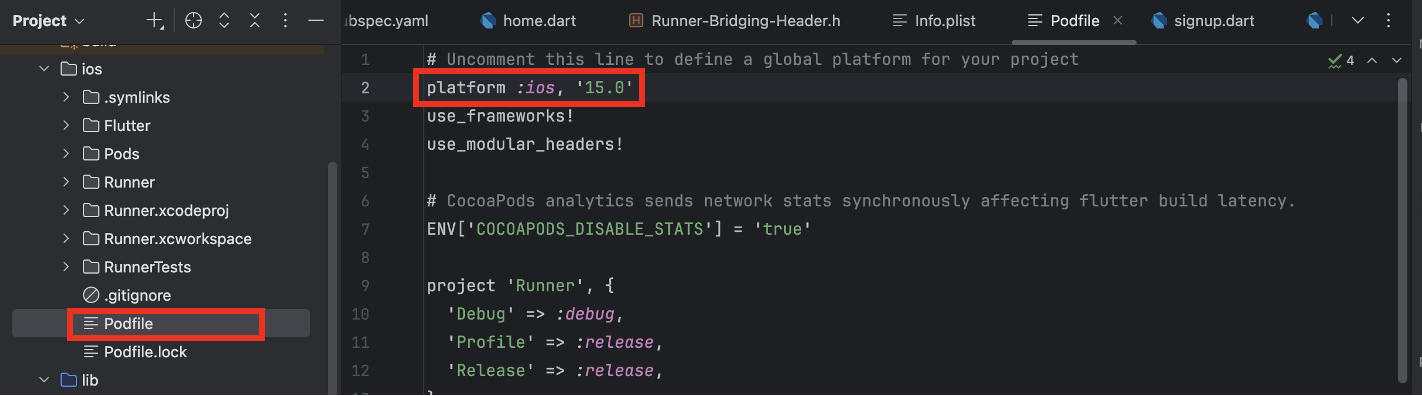
- ios 플랫폼 버젼 설정
- 추가 설정된 내용 터미널로 적용

✅ 페이지별 코드
1️⃣ main.dart
- WidgetsFlutterBinding : Firebase 같은 비동기 초기화를 해야 할 때 사용
- .ensureInitialized() : 초기화가 완료될 때까지 기다림 (Firebase, SharedPreferences, 카메라 등 앱 실행 전에 초기화가 필요한 서비스와 함께 사용)
- Firebase.initializeApp() : firebase 초기화
- primarySwatch : 앱 전체의 테마(색상, 폰트, 버튼 스타일 등)를 정의
import 'package:firebase_core/firebase_core.dart';
import 'package:프로젝트명/home.dart';
import 'package:프로젝트명/login.dart';
import 'package:프로젝트명/signup.dart';
import 'package:flutter/material.dart';

Future<void> main() async {
  // WidgetsFlutterBinding : Firebase 같은 비동기 초기화를 해야 할 때 사용
  // .ensureInitialized() : 초기화가 완료될 때까지 기다림 (Firebase, SharedPreferences, 카메라 등 앱 실행 전에 초기화가 필요한 서비스와 함께 사용)
  WidgetsFlutterBinding.ensureInitialized();
  await Firebase.initializeApp(); // firebase 초기화
  runApp(const MyApp());
}

class MyApp extends StatelessWidget {
  const MyApp({super.key});

  @override
  Widget build(BuildContext context) {
    return MaterialApp(
      title: 'Flutter Demo',
      theme: ThemeData(primarySwatch: Colors.blue), // primarySwatch : 앱 전체의 테마(색상, 폰트, 버튼 스타일 등)를 정의
      initialRoute: '/',
      routes: {
        '/': (context) => const HomePage(),
        '/login': (context) => const LoginPage(),
        '/signup': (context) => const SignupPage(),
      },
    );
  }
}
2️⃣ login.dart
- createState() : LoginPage의 상태를 관리하는 _LoginPageState 객체 생성
- key : Form 위젯의 상태를 구분하거나 추적하는 “식별자” 속성. (어떤 키로 식별될지 지정)
- GlobalKey 변수.currentState : FormState 객체에 접근 (validate, save 등 호출 가능)
- GlobalKey 변수.currentState.validate() : 모든 FormField 검증
- GlobalKey 변수.currentState.save() : 입력값 저장
- FirebaseAuth.instance : Firebase Auth 객체 접근
- .signInWithEmailAndPassword : Firebase Authentication으로 이메일/비밀번호 로그인
import 'package:firebase_auth/firebase_auth.dart';
import 'package:flutter/material.dart';

class LoginPage extends StatefulWidget {
  const LoginPage({super.key});

  @override
  State<LoginPage> createState() => _LoginPageState();  // createState() : LoginPage의 상태를 관리하는 _LoginPageState 객체 생성
}

class _LoginPageState extends State<LoginPage> {
  final _key = GlobalKey<FormState>();  //
  final TextEditingController _emailController = TextEditingController();
  final TextEditingController _pwdController = TextEditingController();

  @override
  Widget build(BuildContext context) {
    return Scaffold(
      appBar: AppBar(title: const Text("Firebase App")),
      body: Container(
        padding: const EdgeInsets.all(15),
        child: Center(
          child: Form(
            key: _key,  // key : Form 위젯의 상태를 구분하거나 추적하는 “식별자” 속성. (어떤 키로 식별될지 지정)
            child: Column(
              mainAxisSize: MainAxisSize.min,
              children: [
                emailInput(),
                const SizedBox(height: 15),
                passwordInput(),
                const SizedBox(height: 15),
                loginButton(),
                const SizedBox(height: 15),
                TextButton(
                  onPressed: () => Navigator.pushNamed(context, '/signup'),
                  child: const Text("Sign Up"),
                ),
              ],
            ),
          ),
        ),
      ),
    );
  }

  TextFormField emailInput() {
    return TextFormField(
      controller: _emailController,
      autofocus: true,
      validator: (val) {
        if (val!.isEmpty) {
          return 'The input is empty.';
        } else {
          return null;
        }
      },
      decoration: const InputDecoration(
        border: OutlineInputBorder(),
        hintText: 'Input your email address.',
        labelText: 'Email Address',
        labelStyle: TextStyle(fontSize: 18, fontWeight: FontWeight.bold),
      ),
    );
  }

  TextFormField passwordInput() {
    return TextFormField(
      controller: _pwdController,
      obscureText: true,
      autofocus: true,
      validator: (val) {
        if (val!.isEmpty) {
          return 'The input is empty.';
        } else {
          return null;
        }
      },
      decoration: const InputDecoration(
        border: OutlineInputBorder(),
        hintText: 'Input your password.',
        labelText: 'Password',
        labelStyle: TextStyle(fontSize: 18, fontWeight: FontWeight.bold),
      ),
    );
  }

  ElevatedButton loginButton() {
    return ElevatedButton(
      onPressed: () async { // 버튼 누르면 내부 기능을 비동기로 실행
        // _key.currentState.validate() : 모든 FormField 검증
        // _key.currentState.save() : 입력값 저장
        if (_key.currentState!.validate()) {  // _key.currentState : FormState 객체에 접근 (validate, save 등 호출 가능)
          try {
            await FirebaseAuth.instance // FirebaseAuth.instance : Firebase Auth 객체 접근
                .signInWithEmailAndPassword(  // Firebase Authentication으로 이메일/비밀번호 로그인
                  email: _emailController.text,
                  password: _pwdController.text,
                )
                .then(
                    (_) => Navigator.pushNamed(context, "/"));  // Navigator : 화면 전환을 담당하는 라우터 (push, pushNamed, pop, pushReplacement 등으로 동작)
          } on FirebaseAuthException catch (e) {
            if (e.code == 'user-not-found') {
              debugPrint('No user found for that email.');
            } else if (e.code == 'wrong-password') {
              debugPrint('Wrong password provided for that user.');
            }
          }
        }
      },
      child: Container(
        padding: const EdgeInsets.all(15),
        child: const Text("Login", style: TextStyle(fontSize: 18)),
      ),
    );
  }
}
3️⃣ signup.dart
- GlobalKey<FormState> : Form 위젯을 고유하게 식별하고, Form의 상태(FormState)에 접근할 수 있게 해주는 키
- .createUserWithEmailAndPassword() : email과 password로 유저 계정 생성
- weak-password : Firebase 전용 코드 (Firebase의 기본 기준으로 보통 최소 길이(6자 미만)일 경우 발생)
- email-already-in-use : Firebase 전용 코드 (이미 존재하는 이메일)
import 'package:firebase_auth/firebase_auth.dart';
import 'package:flutter/material.dart';

class SignupPage extends StatefulWidget {
  const SignupPage({super.key});

  @override
  State<SignupPage> createState() => _SignupPageState();
}

class _SignupPageState extends State<SignupPage> {
  final _key = GlobalKey<FormState>();  // GlobalKey<FormState> : Form 위젯을 고유하게 식별하고, Form의 상태(FormState)에 접근할 수 있게 해주는 키
  final TextEditingController _emailController = TextEditingController();
  final TextEditingController _pwdController = TextEditingController();

  @override
  Widget build(BuildContext context) {
    return Scaffold(
      appBar: AppBar(title: const Text("Firebase App")),
      body: Container(
        padding: const EdgeInsets.all(15),
        child: Center(
          child: Form(
            key: _key,
            child: Column(
              mainAxisSize: MainAxisSize.min,
              children: [
                emailInput(),
                const SizedBox(height: 15),
                passwordInput(),
                const SizedBox(height: 15),
                submitButton(),
                const SizedBox(height: 15),
              ],
            ),
          ),
        ),
      ),
    );
  }

  TextFormField emailInput() {
    return TextFormField(
      controller: _emailController,
      autofocus: true,
      validator: (val) {
        if (val!.isEmpty) {
          return 'The input is empty.';
        } else {
          return null;
        }
      },
      decoration: const InputDecoration(
        border: OutlineInputBorder(),
        hintText: 'Input your email address.',
        labelText: 'Email Address',
        labelStyle: TextStyle(fontSize: 18, fontWeight: FontWeight.bold),
      ),
    );
  }

  TextFormField passwordInput() {
    return TextFormField(
      controller: _pwdController,
      obscureText: true,
      autofocus: true,
      validator: (val) {
        if (val!.isEmpty) {
          return 'The input is empty.';
        } else {
          return null;
        }
      },
      decoration: const InputDecoration(
        border: OutlineInputBorder(),
        hintText: 'Input your password.',
        labelText: 'Password',
        labelStyle: TextStyle(fontSize: 18, fontWeight: FontWeight.bold),
      ),
    );
  }

  ElevatedButton submitButton() {
    return ElevatedButton(
      onPressed: () async {
        if (_key.currentState!.validate()) {
          try {
            final credential = await FirebaseAuth.instance  // FirebaseAuth.instance : Firebase Auth 객체 접근
                .createUserWithEmailAndPassword(  // email과 password로 유저 계정 생성
                  email: _emailController.text, // _emailController.text : TextEditingController 객체를 통해 사용자가 입력한 텍스트를 가져옴
                  password: _pwdController.text,
                )
                .then(
                    (_) => Navigator.pushNamed(context, "/"));  // Navigator : 화면 전환을 담당하는 라우터 (push, pushNamed, pop, pushReplacement 등으로 동작)
          } on FirebaseAuthException catch (e) {
            if (e.code == 'weak-password') {  // weak-password : Firebase의 기본 기준으로 보통 최소 길이(6자 미만)일 경우 발생
              print('The password provided is too weak.');
            } else if (e.code == 'email-already-in-use') {  // email-already-in-use : Firebase 전용 코드 (이미 존재하는 이메일)
              print('The account already exists for that email.');
            }
          } catch (e) {
            print(e.toString());
          }
        }
      },
      child: Container(
        padding: const EdgeInsets.all(15),
        child: const Text("Sign Up", style: TextStyle(fontSize: 18)),
      ),
    );
  }
}
4️⃣ home.dart
- StreamBuilder() : 실시간 데이터 스트림을 구독하고 UI를 자동 업데이트 (ex. 로그인 상태 변화, Firestore 데이터 변경 등)
- authStateChanges() : 로그인/로그아웃 등 인증 상태 변화
- await FirebaseAuth.instance.signOut() : Firebase로 접속한 계정 로그아웃
import 'package:firebase_auth/firebase_auth.dart';
import 'package:프로젝트명/login.dart';
import 'package:flutter/material.dart';

class HomePage extends StatefulWidget {
  const HomePage({super.key});

  @override
  State<HomePage> createState() => _HomePageState();
}

class _HomePageState extends State<HomePage> {
  @override
  Widget build(BuildContext context) {
    return StreamBuilder( // StreamBuilder() : 실시간 데이터 스트림을 구독하고 UI를 자동 업데이트 (ex. 로그인 상태 변화, Firestore 데이터 변경 등)
      stream: FirebaseAuth.instance.authStateChanges(),   // authStateChanges() : 로그인/로그아웃 등 인증 상태 변화
      builder: (BuildContext con, AsyncSnapshot<User?> user) {
        if (!user.hasData) {
          return const LoginPage();
        } else {
          return Scaffold(
            appBar: AppBar(
              title: const Text("Firebase App"),
              actions: [
                IconButton(
                  icon: const Icon(Icons.logout),
                  onPressed: () async => await FirebaseAuth.instance.signOut()  // await FirebaseAuth.instance.signOut() : Firebase로 접속한 계정 로그아웃
                    .then(
                        (_) => Navigator.pushNamed(context, "/login"),
                  ),
                ),
              ],
            ),
            body: const Center(child: Text("Successfully logged in!")),
          );
        }
      },
    );
  }
}
5️⃣ 테스트

'IT 언어 > Flutter' 카테고리의 다른 글
| [Flutter] Carousel Silder (자동 슬라이드) [맥북💻] (0) | 2025.10.03 |
|---|---|
| [Flutter] ListView 페이지 스크롤 [맥북💻] (0) | 2025.09.30 |
| [Flutter] MVVM 패턴 (Consumer, ChangeNotifierProvider)[맥북💻] (0) | 2025.09.29 |
| [Flutter] Form 양식 제출 (GlobalKey, TextFormField, ModalRoute) [맥북💻] (0) | 2025.09.29 |
| [Flutter] 웹뷰 (webview_flutter) [맥북💻] (0) | 2025.09.28 |